CSS Box model
November'20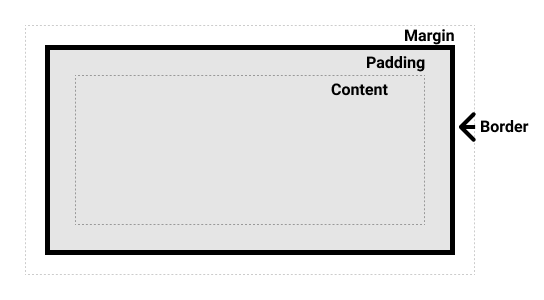
Everything in CSS has a box around it, and understanding these boxes is key to being able to create layouts with CSS, or to align items with other items. In this lesson, you will take a proper look at the CSS Box Model so that you can build more complex layout tasks with an understanding of how it works and the terminology that relates to it.
What is a CSS box model?
The full CSS box model applies to block boxes, inline boxes only use some of the behavior defined in the box model. The model defines how the different parts of a box — margin, border, padding, and content — work together to create a box that you can see on the page. To add some additional complexity, there is a standard and an alternate box model.
Parts of a box
Making up a block box in CSS we have the:
- Content box: The area where your content is displayed, which can be sized using properties like width and height.
- Padding box: The padding sits around the content as white space; its size can be controlled using padding and related properties.
- Border box: The border box wraps the content and any padding. Its size and style can be controlled using border and related properties.
- Margin box: The margin is the outermost layer, wrapping the content, padding and border as whitespace between this box and other elements. Its size can be controlled using margin and related properties.
Summary
From the above points , you would've understood the most about Box model. For more information, refer to MDN.